Purchasing the RTX 5070

Before purchasing ANY GPU, you should know what your goals are for building a PC. For example, if you like to play triple A, graphically intensive games, you should prioritize GPU performance and feature set, as well as more cinematic monitor specifications (1440p/4k, HDR, Color Accuracy, etc). If you like to play more competitive games, your budget should prioritize CPU performance, peripherals, and monitor specifications that give you a greater advantage (1080p/1440p, High Refresh Rate, Good Motion clarity). A good quality power supply (PSU) from a reputable brand is also essential. Lower quality PSUs are more at risk to malfunction, which may break additional hardware in your computer. There are even cases of good PSUs malfunctioning so it is important to buy your PSU from a reputable brand with a warranty that will replace your PSU (or even your PC) if it ever malfunctions. There are tier lists available on online to find a good quality PSU if you want to look for yourself (SPL's PSU Tier List), however, for the RTX 5070, we can recommend good 750 watt PSUs like CORSAIR RM750e and MSI MAG A750GL. Both these brands have good warranty in case the PSU does malfunction.

The RTX 5070 is a very good card for those who want to get into PC gaming as it has very strong capabilities in a wide range of games and resolutions. However, it has raised above its MSRP of $549, which may make it hard to fit into your budget. Fortunately, with some deal hunting, there is a to get around this price increase:

NewEgg Deals NewEgg typically offers free gifts with the purchase of a new GPU. While the 5070 is currently about 100$ above MSRP, NewEgg offers games (like the Resident Evil 9 game) and PC parts that make it worth the extra that is being paid.
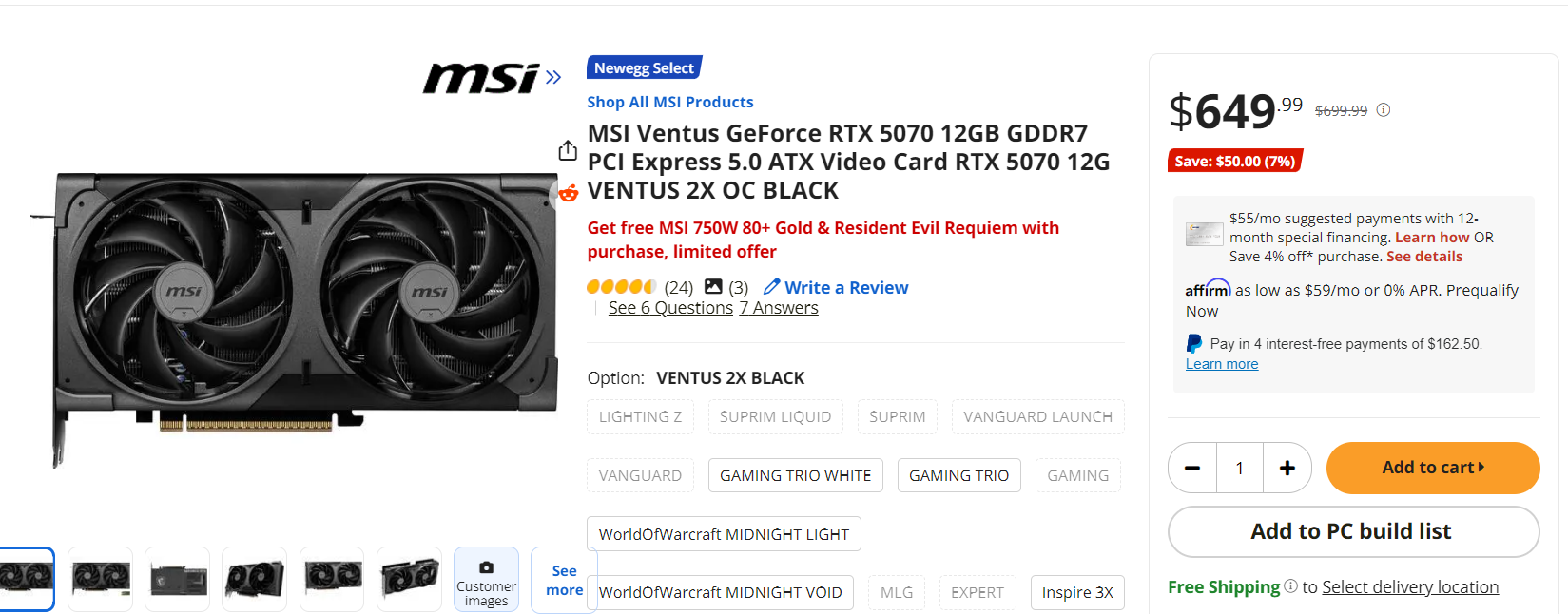
This 5070 comes with a good quality 750W PSU and the newest Resident Evil Game. Even if you aren’t interested in the game, having a PSU worth $110 will allow you to purchase the 5070 essentially at MSRP You could also look at the used market, however this isn’t as recommended since you may not be able to get warranty for your card and you could run into problems, depending on how the old owner used the GPU Last but not least, you want to make sure your card fits your PC case. The amount of fans a GPU is an easy way to determine whether your GPU will work for your case. A 2 fan card, like the one above, will fit most standard cases, however a 3 fan card may require a larger, ATX case.
Installing the RTX 5070

This guide will go over the physical installation of the RTX 5070, as well as software/drivers you’ll need to install. installing the RTX 5070 is essentially the same process, except for one small part: The new 12V-2x6 power connector, which will be discussed in more detail later. If you’ve used a different GPU on your PC, it is a good idea to download the drivers of your new GPU and then uninstall your old GPU’s drivers via DDU (Especially if moving from an AMD or Intel GPU).

Preparation:
Step 1: Shut down your PC completely.
Step 2: Unplug all cables from the system.
Step 3: Press the power button once to discharge remaining electricity.

Installing the GPU:
Step 1: Open your PC case.
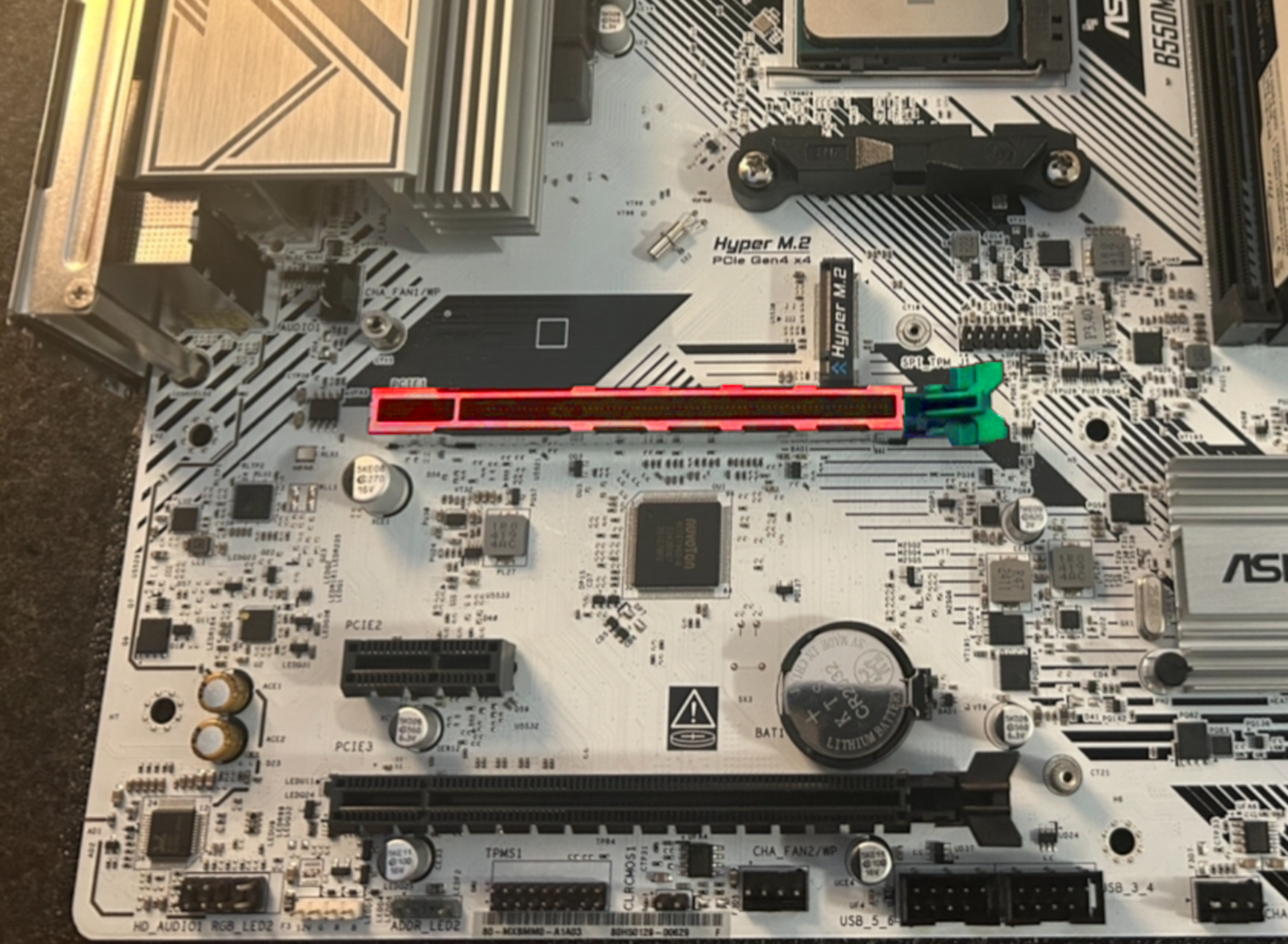
Step 2: Locate the PCIe slot on the motherboard (in red below, usually the top slot).
Step 3: Push down the retention clip on the slot (in green below).
Step 4: Remove the required expansion slot covers using a screwdriver.
Step 5: Align the GPU with the PCIe slot.
Step 6: Insert the GPU firmly until you hear a click.
Step 7: Secure the GPU to the case using screws.

Make sure the card sits level. If it sags, consider using a GPU support bracket.

Powering the GPU:
Step 1: Locate the 12V-2x6 adapter included with your GPU.
Step 2: Connect the adapter to your GPU.
Step 3: Attach PSU cables to the adapter (usually 8-pin connectors).
Step 4: Ensure all cables are fully seated.

Driver Installation:
Step 1: Turn on your PC.
Step 2: Download drivers from:
NVIDIA Driver Page
Step 3: Install the drivers.
Step 4: Restart your system.

If switching from AMD or Intel GPUs, use DDU (Display Driver Uninstaller) before installing new drivers.

Testing:
- Launch a game
- Run benchmarks like 3DMark Demo
- Monitor temperatures and performance

Software Guide (DLSS 4 and 4.5)

DLSS is a set of technologies developed by NVIDIA that allow for increased FPS, lower latency, and better image quality. Every Nvidia RTX GPU supports the most recent updates to DLSS, however, older cards may not have the hardware to efficiently run some of the newest technologies Nvidia has to offer. Since the 5070 is part of the latest series of Nvidia GPU, it has the technology necessary to support the DLSS 4.5, the most recent update to DLSS by Nvidia. While it will also fully support DLSS 5 in the future, this guide will go into detail about the technology that is currently available to us and how to use it for the best experience.

Upscaling Multi-Frame Generation Ray / Path Tracing